







Skip to content

White-label platform for agencies · Official Meta partner

Describe your client's customer service. The Copilot builds the rest.

The Copilot builds AI agents, flows, CRM and scheduling for WhatsApp, Instagram and phone calls in about 30 minutes. You review it, switch it on and resell it under your brand.

  • Official WhatsApp API
  • No coding required
  • No lock-in contract
Meta Business Partner
One connected experience, from dashboard to phone. Illustrative interface.

Multichannel support.
Channels depend on your plan.

All connected
  • WhatsApp
  • Instagram
  • Phone calls (AI voice)
  • Messenger
  • TikTok
  • Telegram
  • SMS
  • Email
  • Webchat

Flash Chat

Live chat on your phone.

With Flash Chat, your team signs in with your agency’s domain and replies to customers on iPhone or Android.


Flash Chat · App StoreGoogle Play

Your logo

The same live chat, with your brand.

Give your clients a mobile chat experience with your agency’s branding. Your team signs in with your domain and sees your logo in the app.

Request a quote
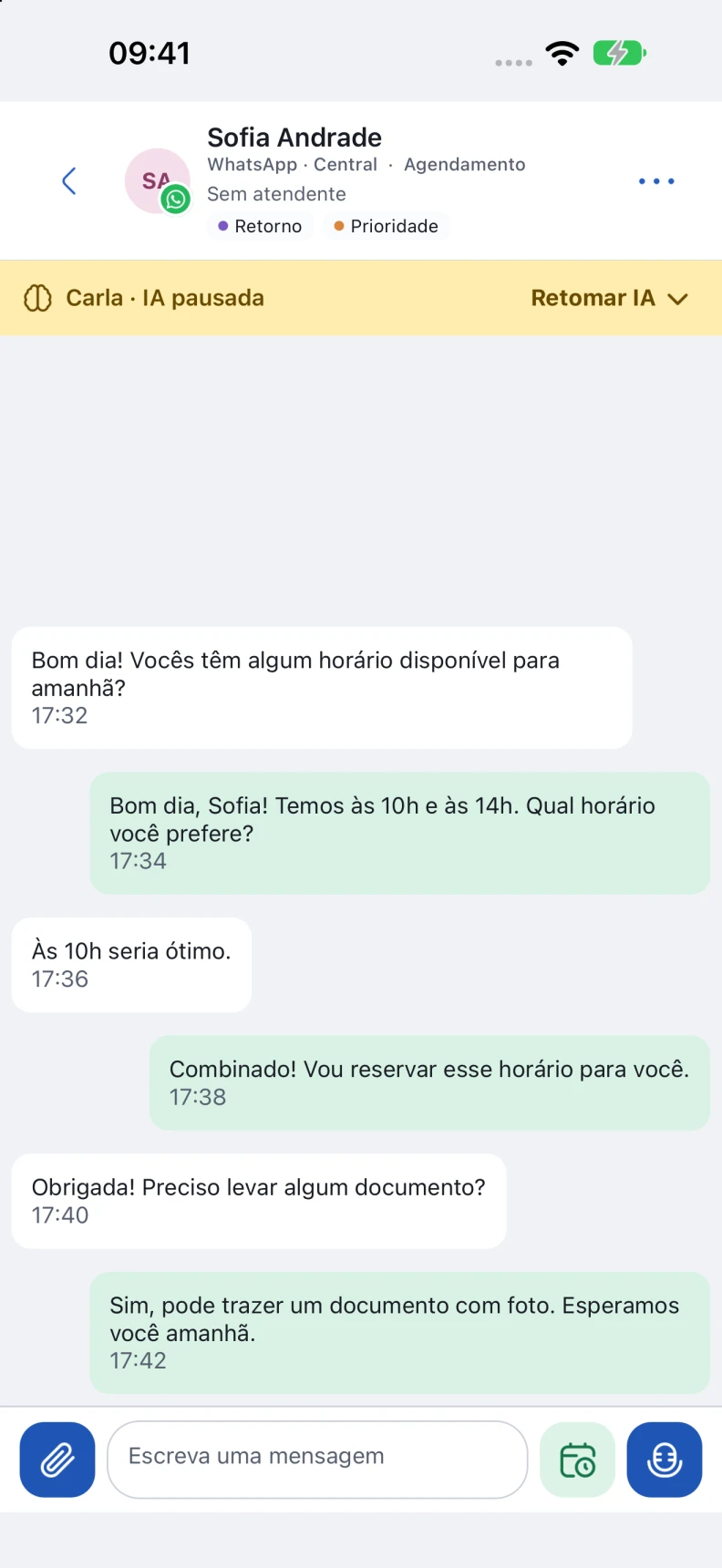
Flash Chat showing Sofia and a team member arranging an appointment.

From request to live customer service
in about 30 minutes.

No drawing flows or writing prompts from scratch. Explain how your client serves customers and the Copilot hands you the project, already built.

YOU ASK: “Build a customer service setup for my clinic. I need to qualify contacts, book appointments and follow up.” An example of what you can ask Copilot.
  1. 01

    Describe the business

    Explain the goal and how your client serves customers, in your own words.

  2. 02

    The Copilot builds everything

    AI agents, flows, pipeline, scheduling and integrations, already connected.

  3. 03

    Review, test and go live

    You approve every detail. The agents start serving customers.

Request a trial
Your Copilot, in actionCOPILOTS
A real estate project taking shape

Pipeline, fields and agent instructions set up in the workspace, with the next configuration steps mapped out.

Your operation, analyzed in one conversation

A summary of your conversations, a review of the replies and suggestions to keep conversations flowing.

From first contact to follow-up

Qualification, scheduling and follow-up connected in one flow, with review and activation under your control.

A workspace for building with agents

The Hermes Agent interface brings conversations, tools, skills and MCP connections together in one workspace.

Customer service analysis with Grok Bot

Reviewing support answers and creating a daily monitoring routine.

Usage screenshot: prices and information in the conversation do not replace current terms. View current plans

Choose the intelligence
that works with you.

ClaudeChatGPTDeepSeekHermes Agent (Nous Research)Hermes AgentGrok BotGrok Bot

Resell AI under your brand.
And keep the margin.

Every client gets a workspace with your brand and your domain.

  • Your brand, your domainLogo, colors and URL that match your identity.
  • A dedicated operation for every clientThe Agency reseller plan is tailored to each agency.
  • Copilot to speed up every deliverySet up and evolve projects with less effort.
  • Reseller plans with your own billingWith the reseller module (add-on): your payment link, a trial period, and the client's panel blocked automatically when the plan expires unpaid.
  • Set up once, repeatClone one client's setup into another and reuse integration keys across clients.
How the white label works
Illustrative interface.

Your client sees your brand. Across the entire experience.

Reseller calculator

Estimate your monthly revenue

Monthly revenue
$1,000

Estimated gross revenue before operating costs.

Request a quote

Customer service, CRM and automation
in one platform.

Omnichannel support, CRM and AI automation.
Meta CAPI (Conversions API) integration and multiple MCP connections. Explore real platform screens.

● ● ● zaptor.devREAL PRODUCT SCREEN

Visual Flow Builder: Customer Service Flows, Built Automatically

Copilot connects Start, Action and End without you drawing a single node. The flow above wins back lost leads in a sales funnel with automated follow-up messages.

● ● ● zaptor.devREAL PRODUCT SCREEN

Live Customer Service: AI with a 'Pause AI' Button

Follow your customers on WhatsApp in real time. The AI replies like a human, and your team can pause it or jump in with a single click.

● ● ● zaptor.devREAL PRODUCT SCREEN

Sales Pipelines: Leads Move Through the Kanban on Their Own

Every contact becomes a card in the funnel. As the AI qualifies the lead or books the visit, the card moves across the columns by itself (New Lead ➔ Qualified ➔ Visit ➔ Proposal).

● ● ● zaptor.devREAL PRODUCT SCREEN

Scheduling & Google Calendar: Appointments That Book Themselves

Connected to your calendar. The AI checks open slots, books with the customer on WhatsApp and blocks the time on your calendar automatically.

● ● ● zaptor.devREAL PRODUCT SCREEN

Dashboard & Metrics: AI vs. Human

Track total message volume, conversion rate and your team's response speed in real time.

Agents that also make calls

Beyond text conversations, your AI agent answers and makes voice calls.

TEAM AND OPERATIONS

Your team works side by side with AI.
And every conversation reaches the right person.

Departments, smart handoff, internal chat and tasks, in the same panel as your AI agents.

For your team

  • AI hands over at the right moment

    When a customer needs a person, the agent transfers to the right teammate or department and pauses itself. Outside team hours, it keeps helping and lets the customer know. Later, the AI resumes with your instructions.

  • Departments with rotation

    Organize your team into departments. Each transferred conversation goes to the next available teammate, within each person's working hours.

  • Internal chat

    Direct messages, groups and a one-click group per department, with file sharing. Plus an AI assistant just for the team.

  • Roles and permissions

    Owner, Admin and Agent, with per-person permissions: which channels each one sees, the queue and teammates' conversations.

  • Tasks with queues

    Tasks with due dates and priority, for one person or a department queue: whoever is free picks it up. Phone reminders and a Kanban view.

  • Operations dashboard

    Workload per teammate and per department, who is waiting right now, and AI-written reports sent by email or WhatsApp.

  • Faster replies

    Quick replies with /, internal notes with @mentions, folders, saved filters and AI to polish a draft or summarize the conversation.

30+ ready-made integrations for your AI agents and automations.

  • OpenAI
  • n8n
  • Google Workspace
  • Google Drive
  • Google Sheets
  • Google Docs
  • Google Forms
  • Supabase
  • Anthropic Claude
  • Notion
  • Cal.com
  • Meta Conversions API
  • Google Gemini
  • ClickUp
  • ElevenLabs
  • Google Maps
  • Perplexity
  • InfinitePay
  • Firecrawl
  • Obsidian
  • Baserow
  • DeepSeek
  • Twilio
  • Resend
  • Mistral AI
  • Apify
  • OpenRouter
  • xAI Grok
  • Tavily
  • Autentique
  • Langfuse
  • Comtele
  • CNPJA
  • AwesomeAPI
  • 9router
  • OmniRoute

MCP · Model Context Protocol

Multiple MCP integrations

Connect your AI agents to the tools your business already uses. Access data and trigger actions through MCP, according to configured permissions.

  • Google Workspace

    Drive, Sheets, Docs and Forms with your Google account and the files you choose.

  • Baserow

    Database and CRM as the agent's source of truth.

  • Supabase

    Postgres and authentication with real-time reads and writes.

  • Cal.com

    Smart scheduling with live availability.

  • n8n

    Workflows and automations triggered directly by the agent.

  • Notion

    Documents and knowledge bases the agent can look up.

  • Obsidian

    Obsidian notes and knowledge bases the agent can look up.

  • Firecrawl

    Real-time data extraction from any website.

  • Apify

    Web scraping and automation at scale for the agent.

  • Tavily

    Real-time web search optimized for AI.

  • Perplexity

    Web research with sources to back up the agent's answers.

  • Google Calendar

    The agent checks availability and creates calendar events.

Plans for customer service or reselling

Choose for your operation. Monthly prices in US dollars (USD).

Start serving customers

Basic Plan

Monthly price

$20/mo

For businesses serving customers on WhatsApp.

Request a trial
  • 1 official WhatsApp API channel
  • Up to 500 contacts
  • 1 user
  • 1 AI agent
  • No Copilot
  • No Zaptor API access
Automate your operation

PRO Plan

Monthly price

$49/mo

Use Copilot to support customers on WhatsApp and Instagram.

Request a trial
  • Up to 1,000 active contacts
  • Official WhatsApp and Instagram
  • 2 users
  • Projects & Analysis Copilot included
  • AI agents for chat and phone calls
  • Zaptor API access

Included in Basic and PRO

  • Live chat
  • Team chat
  • CRM pipelines
  • Workflow automation
  • Bulk messaging
  • Appointment scheduling
  • Tasks
  • MCP integrations
  • Webhooks

Reseller? You can also choose individual plans.

AI provider usage and add-ons are billed separately. Check included channels and limits before subscribing.

SPECIAL OFFER FOR AGENCIES

Move your agency to Zaptor with a special offer.

Already serving clients on another platform? Explore special terms for moving your agency to Zaptor and serving clients under your own brand.

  • Discuss your business’s migration needs.
  • Get a proposal tailored to the size of your agency.
  • See customer service, the Copilot and White Label in a demo.

Migration terms are defined in a proposal tailored to your business. No-obligation consultation.

Contact our team

Request a trial or tell us how we can help your business.

This helps our team understand your migration.

Your details will be shared with our team via WhatsApp to handle your request. Read our Privacy Policy.

Your answers will be included in the message. Review it and press send in WhatsApp.

Frequently Asked Questions

Answers about AI, dual white label, omnichannel support, Meta CAPI and MCP integrations.

The Copilot is your project-building and customer service intelligence assistant: it structures your agents' instructions, designs the logic paths in the Flow Builder (start, message, follow-up, closing), connects integrations and runs conversation analysis (sentiment, identifying customer questions and bottleneck reports for your team). Important: the Copilot does not talk directly to your end customers — the front-line 24/7 service is handled by your AI agents, approved by you.

Basic includes one official WhatsApp API channel. PRO includes two channels: official WhatsApp and Instagram.

The Projects & Analysis Copilot is included starting with the PRO Plan ($49/mo) and in the Agency Plan, with no extra fees. Basic includes one AI agent and has no Copilot.

Basic includes 1 user and PRO includes 2 users, with owner, admin and agent roles and granular permissions. On the Agency plan, you set the limits for each client workspace.

The Agency reseller plan is tailored to each agency. Fill out the contact form for pricing and details.

No lock-in. You can cancel your subscription directly from the dashboard at any time in 1 click, with no cancellation fees.
See all Zaptor questions →

Want to resell Zaptor
under your own brand?

Resell under your own brand. Fill out the contact form for Agency pricing and plan details.